AutoRun Pro Enterprise
AutoRun
Pro Enterprise
12.0.4.132
Download
Buy
now
AutoRun Pro Enterprise
is a popular design tool for rapid creation of
autorun CD browsers and presentations. Offering a simple
point-and-click design environment, AutoRun Pro Enterprise allows
anyone, regardless of computer competence and creative ability, to
blend texts, images, video and audio into an interactive front-end for
CDs and DVDs. In doing this, you can make use of wizards, templates and
demos that let you jumpstart your autorun project in minutes. The end
result can be compiled as a single executable file and burned onto a CD
or DVD disk directly using the built-in CD Burner.
The best in AutoRun
Pro Enterprise is that it has been designed with
the ordinary user in mind, the one who doesn’t want to take
the time to learn how to use a complicated design tool or hire a
designer to do the work. It lets you create and edit a front-end in
much the same way as you would design a presentation in Microsoft
PowerPoint. Just click, drag, position in the desired area and preview
to see whether you have the intended result. In just a few clicks, you
can create a main page, a splash screen, an agreement form, a security
form and an exit form, plus add the unlimited number of sub pages.
Pages can be connected by using transition effects like page shadow,
page fade in, fade out and others. You can elaborate pages by adding
buttons, images, simple text, links and many other objects and
associate each of them with an action so that end users can interact
with and navigate through the front-end content. The front-end can let
them open and execute files, print documents, send email, visit web
sites, browse CD and more.
AutoRun Pro Enterprise
is a powerful visual tool to create professional
autorun (autoplay) interfaces and presentations for your CD/DVDs. It is
the easiest way to create, edit professional autorun (autoplay)
interface and generate autorun files for CD/DVDs in a WYSIWYG
environment, just click, point, place and test (preview). So all is
visual, fast, simple. AutoRun Pro is easy to learn, with demos and
wizards you can get started in just minutes!
Main Page, Splash
Screen, Screen Background, Agreement Form, Security
Form, Exit Form and unlimited Sub Pages. Page Shadow, Page FadeIn and
FadeOut, and many effects.
25 Objects: Button,
ImageButton, Shape, Image, SimpleText, Label, Link,
Text, ScrollText, ListBox, DropDownList, ListView, TreeView,
ShellListView, ShellTreeView, TextBox, RichText, Explorer, Flash, AVI,
MediaPlayer, SlideShow, Edit, RadioButton and CheckBox.
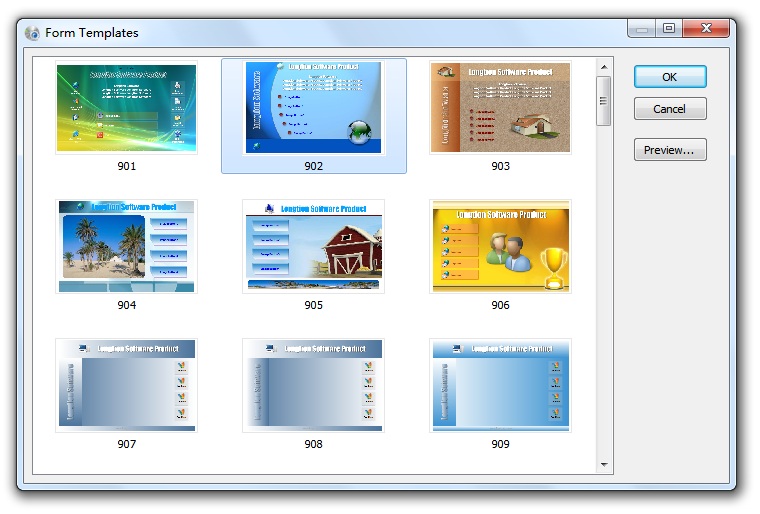
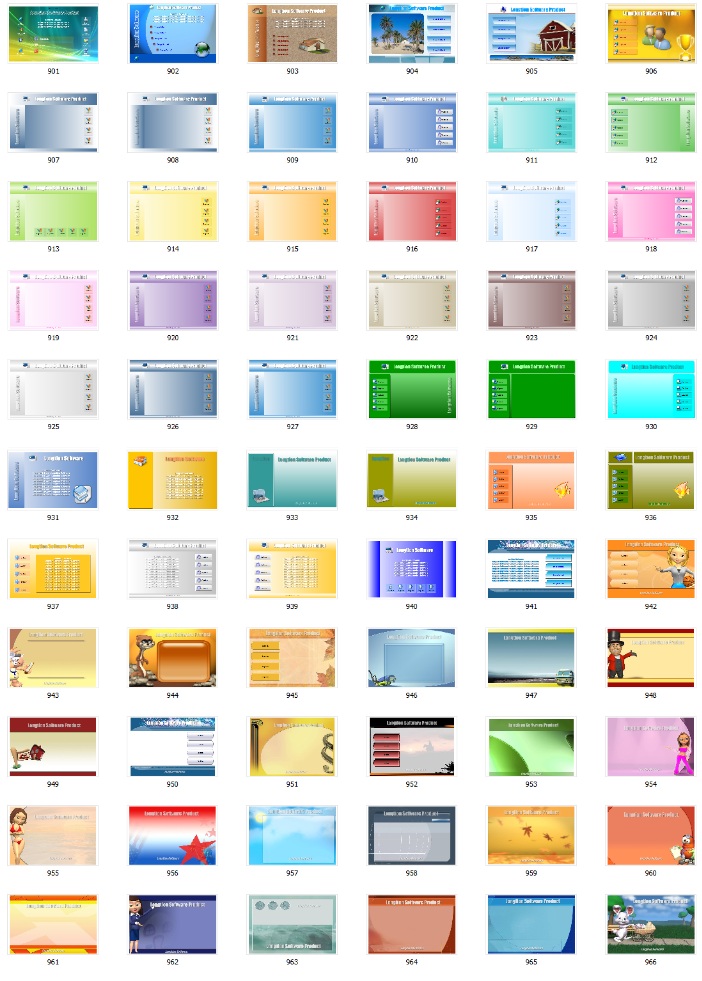
Page Template and
Object Template make it more easy.
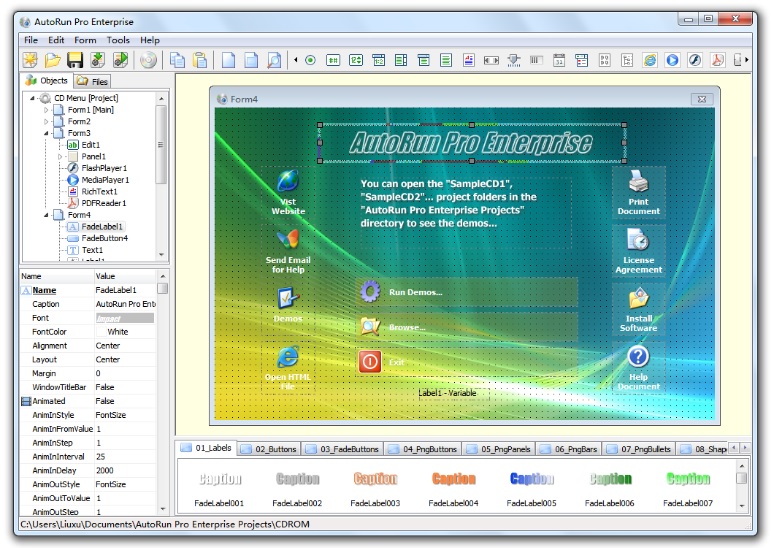
Page Designer

Page Templates

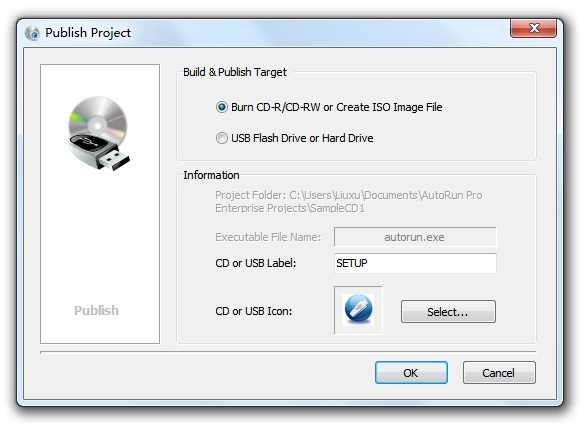
Publish Project

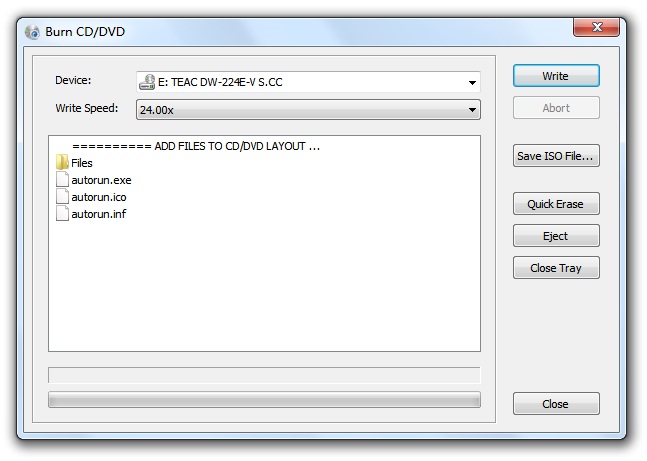
Burn CD with built-in CD
Burner
It's fast
and easy to use. Anyone can quickly create autorun CD-ROMs within
minutes.
AutoRun
Pro Enterprise Features
Operating System:
Win 95, Win 98, Win ME, Win NT4, Win 2000, XP, 2003, Vista
Language: English
License: Shareware
Features:
• Display of every
registered document (e.g.: TXT, DOC, HTML) via automatic start of the
corresponding application.
•
Print of every registered document (e.g.: TXT, DOC, HTML) via automatic
start of the corresponding application.
•
Start any program.
•
Start the default browser with document URL.
•
Send email.
•
Integrated Web browser and internal commands.
•
Integrated sound player.
•
Integrated AVI video player.
•
Integrated RTF (Rich Text) viewer.
•
Integrated Media Player.
•
Slide Show images (Photo album), more than 100 styles.
•
Background color, Gradient color and Transparent Form.
•
Background sound.
•
Splash screen, splash screen sound.
•
Full screen background and logo image.
•
License agreement. You can display a license agreement before any files
are launched. The user is required to accept the license in order to
continue. If the user does not accept the license, then the AutoRun
exits.
•
Security. You can protect your CD from being started by unlicensed
users by requiring users to submit a User Name and Password or an
Authentication Code.
•
Exit Form. Show information or confirm exit before program exits
•
Unlimited Sub Pages.
•
Page FadeIn, FadeOut.
•
Page Shadow.
•
Images include bitmap, icon, JPEG, EMF, WMF, GIF (Static or Animated),
PNG images.
•
Page template.
•
Object template.
•
CD Icon and Page icon can be displayed in the title bar.
•
Test without burning CD.
•
Burn project to CD-R/CD-RW directly with built-in CD Burner.
•
Create a single executable file.
•
Publish project to new folder.
•
Create ISO CD-ROM image file.
•
Install Software - You may want to install a default viewer for the
files if the user does not have one on his computer. For example, if
you are launching a PDF file, you may want to include Adobe Acrobat
Reader software on your CD and install it if the user does not already
have it installed. You can define one or more files to be installed.
•
Create tabbed notebook style application for autorun CDs. It is very
easy.
•
Create drop down menu bar (main menu), tool bar and status bar for
pages like most standard windows to make your page more professional.
•
Create popup menu, you can define the pop-up menu that appears when the
user clicks on an object or page background with the right mouse
button, like most professional applications.
•
CD expire date, Specifies an expiration date for the CDs.
•
Customized hint let users use customized tool tip window instead of the
original system tool tip window.
•
Object group operation.
•
Set object(s) Enable or Disable, Show or Hide Object(s).
•
Action Group (Click Action or Start Action) for more than one action on
user click or start a page.
•
Check style for Button, ImageButton, Image and SimpleText Objects
(Mouse down state indicate the object is selected).
•
No programming knowledge required.
•
No registry entry necessary.
•
Runs from CD-ROM without installation.
•
No runtime module required.
Try it: ARPESetup120.exe
(8.15MB, supports Windows 95/98/me/NT4/2000/XP/2003/Vista).
Buy it: Cost only USD99 for AutoRun
Pro Enterprise. You can buy it from Plimus or RegSoft
After you
register it, you can use the AutoRun Pro Enterprise product to create
unlimited number of autorun CDs for private, public and commercial
distribution. Technical support and upgrades are free forever for
registered users.
Our autorun
CD products (AutoRun Pro Enterprise, AutoRun Pro and AutoRun Expert)
What is the
difference between AutoRun Pro and AutoRun Pro Enterprise?
More
products:
SlideShow Pro
- Create slide shows from your digital pictures and publish them as
Flash Movie (.swf), Executable File (.exe), HTML File (.htm), AutoRun
CD/DVD Files or burn CD/DVD directly with built-in CD Burner.
FlashDemo Pro
- Create professional demos, presentations and tutorials without
programming knowledge and publish them as Flash Movie (.swf),
Executable File (.exe), HTML File (.htm), AutoRun CD/DVD Files or burn
CD/DVD directly with built-in CD Burner.
GIF Animator
- Create or edit animated GIF files for your Web pages easily and
convert your animated GIF file to Flash Movie file (swf).
Home page: http://www.longtion.com